AI Automation Services
AI workflows built to respond, follow up, and report.
BrandBlasting builds practical AI automation for faster lead response, clearer CRM handoffs, useful reporting, and internal assistants—connected workflows your team can put to work.
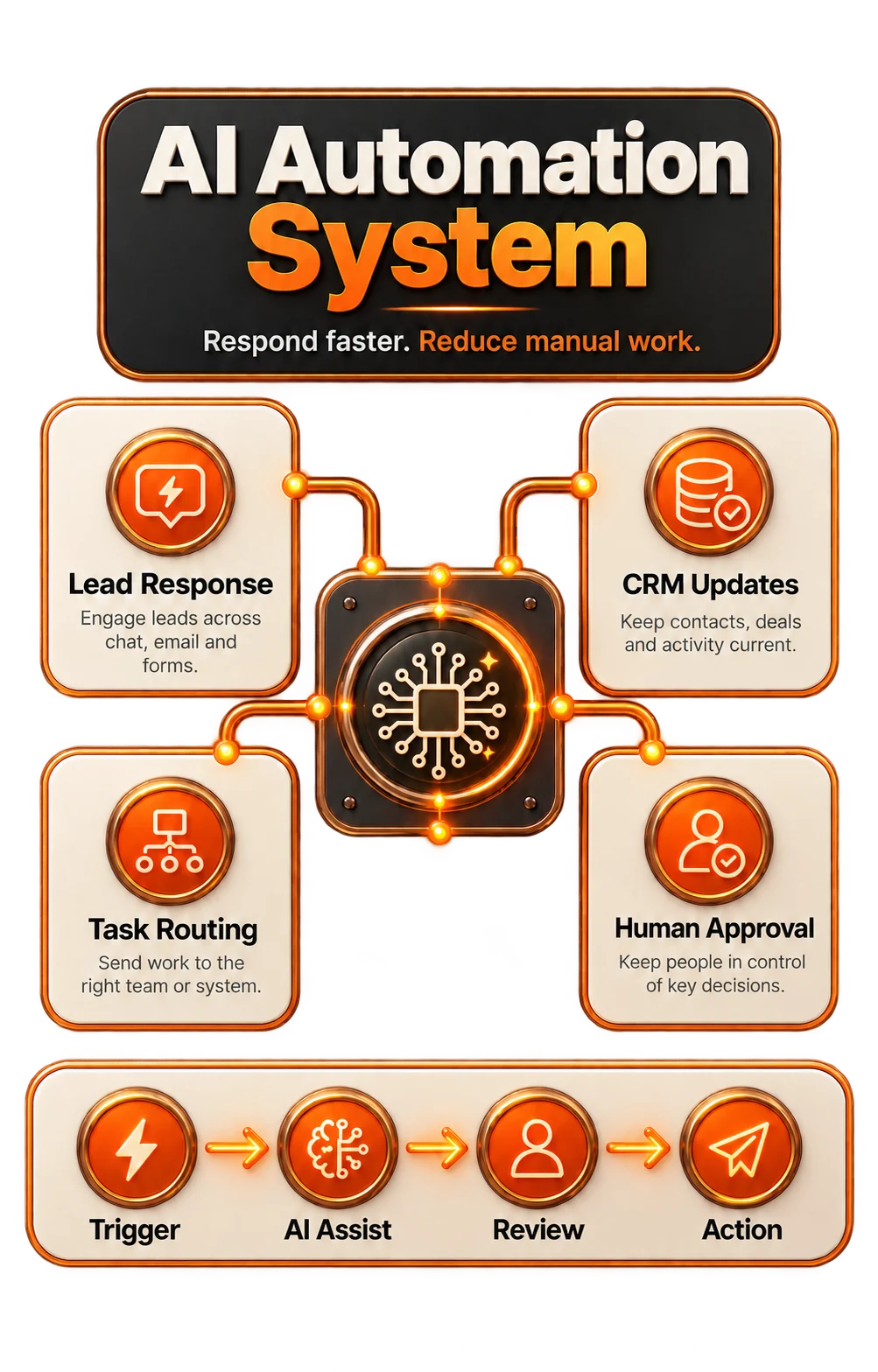
AIworkflow implementation
24/7repetitive task support
Humanapproval where it matters
(01)AI implementation
AI earns its place by improving the work your team does every day.
Another AI demonstration will not fix a slow workflow. Your business needs faster lead handling, less administration, useful reporting, and clear human control over decisions that matter.
Want AI connected to revenue and daily operations?
On a strategy call, we will examine your repetitive work, existing tools, lead-handling gaps, and the first automation worth implementing.
(02)Automation solutions
Make AI work inside the business you already run.
Connect AI where your work happens: CRM, forms, calendars, inboxes, WhatsApp, support tools, documents, dashboards, spreadsheets, Zapier, Make, n8n, APIs, and the routines your team follows.
Typical projects include AI audits, first workflow sprints, assisted sales follow-up, internal knowledge assistants, support triage, automated reporting, content workflows, and integrations between existing tools.
Route, tag, assign, follow up, and report on leads from your website, ads, chat, calls, WhatsApp, and forms without waiting for someone to check each source.
Keep interested prospects in motion with AI-assisted reminders, reactivation, quote follow-up, stalled-deal prompts, and clear booking steps.
Give your team conversation summaries, reply drafts, internal answers, sales context, and suggested next steps, with people approving what happens next.
Manage performance through dashboards, weekly briefings, alerts, and recommendations for owners instead of manually assembling another spreadsheet.
Keep AI accountable with human approval points, access boundaries, tested fallbacks, activity logs, operating notes, and a clear rollback plan.
(03)Revenue workflows
Replace slow handoffs with supervised AI follow-up.
Make the first minutes after an inquiry count. AI can capture the source, assign ownership, draft a response, open a booking path, create tasks, update the CRM, and show managers what happened.
Instant lead handling
Turn inquiries from forms, calls, chat, WhatsApp, ads, and landing pages into routing, tagging, reminder, and follow-up actions.
AI-assisted sales work
Prepare context summaries, reply drafts, call notes, suggested next steps, and CRM field updates for your team to review.
Manager visibility
Spot response delays, owner activity, stalled leads, poor-fit patterns, and overlooked opportunities earlier.
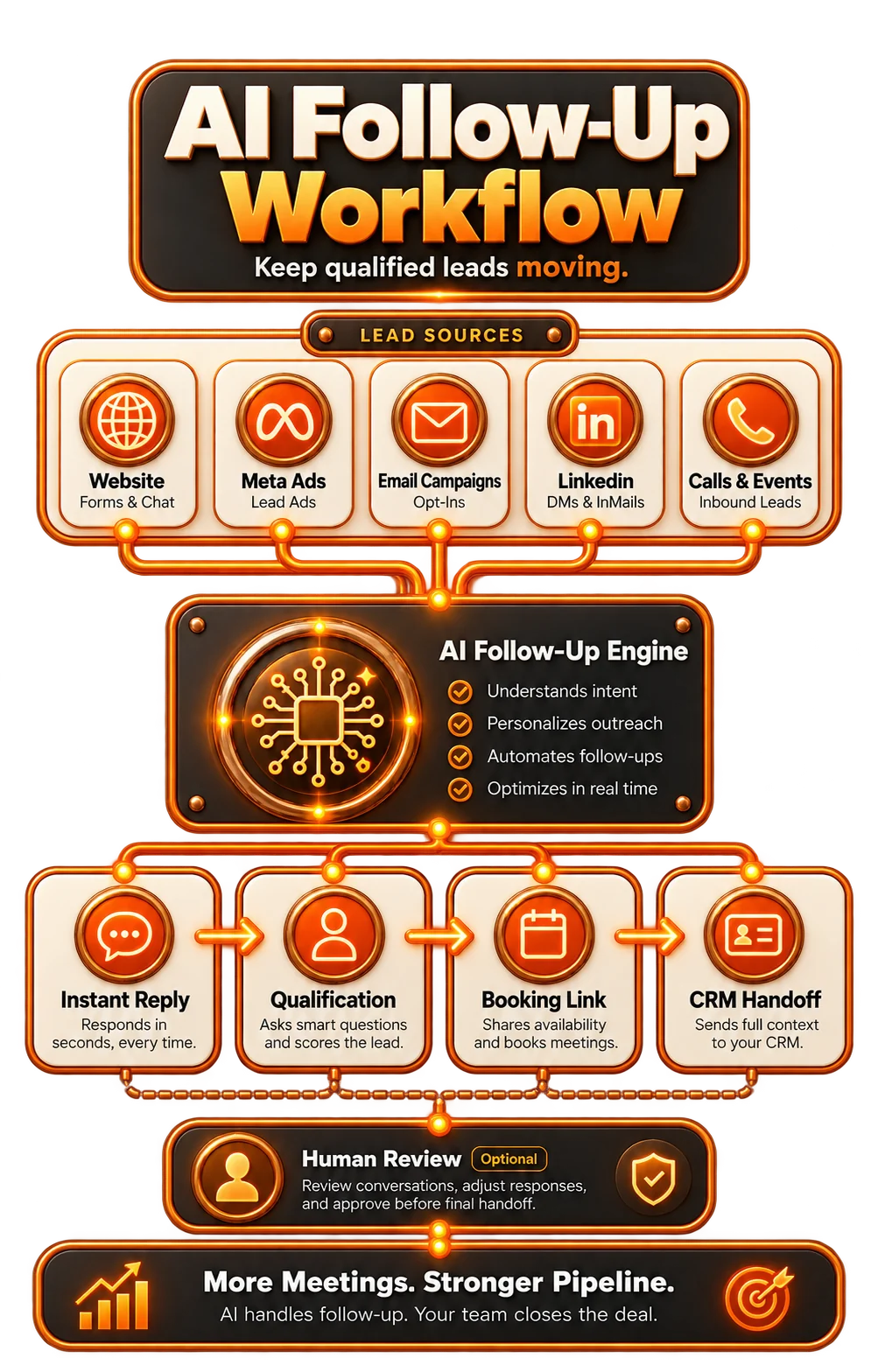
AI follow-up engineLead capture, routing, drafts, tasks, bookings, and handoff.
(04)How we work
Take AI beyond the experiment and into a working business system.
We begin with the workflow and the outcome. Find where AI can save time, improve responses, prevent missed handoffs, and make a measurable difference to everyday operations.
Find valuable automation opportunities
We examine repetitive tasks, broken handoffs, slow responses, manual reporting, and disconnected tools to identify AI opportunities with practical business value.
Define the workflow and safeguards
We specify triggers, required inputs, data limits, approvals, escalation, model and prompt behavior, success measures, and what happens when something fails.
Plan the tool connections
We map the connections your workflow needs across CRM, email, WhatsApp, forms, calendars, ads, support, documents, dashboards, Zapier, Make, n8n, and APIs.
Build the first useful workflow
We begin with useful automations such as lead routing, follow-up tasks, AI drafts, summaries, appointment flows, alerts, reports, and support triage.
Test the exceptions with users
We check invalid inputs, duplicate leads, incorrect owners, missing data, sensitive actions, approvals, failed triggers, and the quality of each handoff.
Launch, train, and refine
We document how it works, train your team, observe the launch, and refine prompts and routing. New workflows follow only once the first ones are working.
Your first AI workflow needs to stand up to real work.
Start with one controlled workflow that earns your team’s trust. Build outward from something people actually use, not disconnected automations.
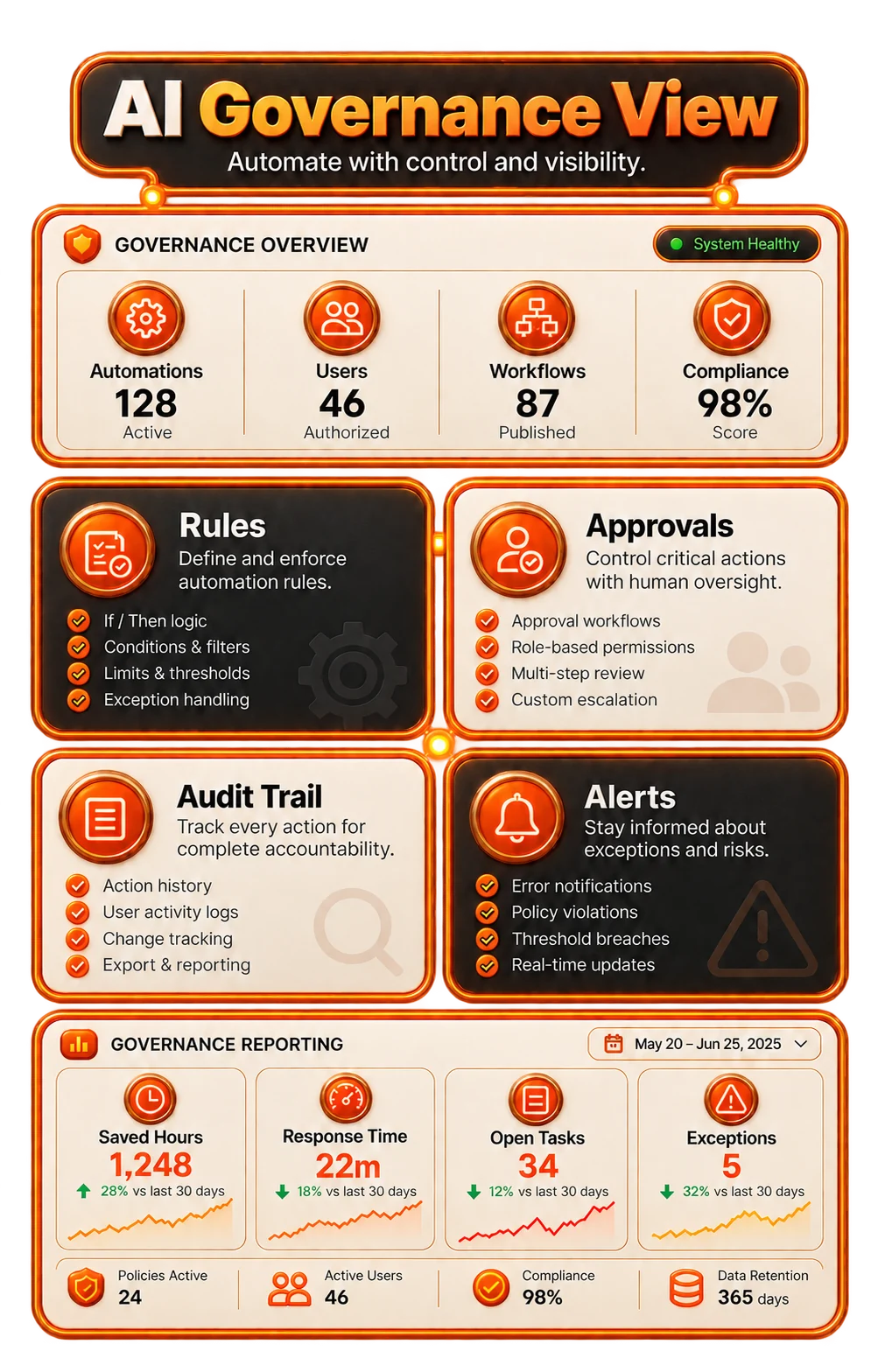
Controlled AI layerApprovals, permissions, logs, reporting, and escalation.
(05)Safety and adoption
Make your team faster. Keep your business in control.
Define the boundaries before AI goes to work: what it can do, what it can draft, what needs approval, and how your team reviews the record.
Human in the loop
Use AI for message drafts, record summaries, and recommendations while people approve decisions with significant consequences.
Traceable behavior
Inspect, repair, and improve each automation using activity logs, test cases, fallback routes, and documented operating procedures.
Team adoption
Make AI part of the working day with training, straightforward workflows, named owners, and dashboards people can use.
(06)Engagement modes
Choose the AI implementation your business needs.
Start with an audit, build your first workflow, or add an ongoing AI operating layer. The right engagement connects the marketing, sales, support, and operations work that needs it.
AI Audit
Automation roadmap- Workflow, tool, data, and repetitive-task audit
- Prioritize valuable AI opportunities by implementation effort, risk, and business impact
- First workflow sprint recommendation
- Metrics, safeguards, and launch-readiness checklist
Sprint
First automation build- One high-value workflow designed end to end
- Configure the required CRM, forms, email, WhatsApp, calendars, dashboards, or integrations
- AI prompts, routing logic, approvals, and human handoff
- Testing, documentation, training, and launch monitoring
AI OS
Ongoing automation layer- Automation roadmap, backlog, governance, and monthly prioritization
- Connect multiple workflows across sales, support, reporting, and daily operations
- Refine prompts, monitor the system, repair workflows, and develop new use cases
- Monthly automation performance view and next-action plan
Where should AI go to work in your business first?
Book a strategy call to review your workflows, tools, lead journey, reporting, support workload, and implementation risks. We will recommend a practical next step.
(07)Measurement
Measure the work AI improves, not the activity it creates.
Judge AI by the operating outcome: quicker responses, fewer manual steps, clearer handoffs, cleaner reports, less repeated explanation, and more opportunities receiving follow-up.
Speed and coverage
Measure response times, completed follow-up, recovered inquiries, ticket triage, and automated task creation.
Hours saved
Reduce effort spent on manual reports, repetitive replies, administration, research, summaries, and content operations.
Quality checks
Review human approvals, missed triggers, poor data, exceptions, escalation rates, and the audit trail.
Next workflows
Rank the next automation opportunities by business impact, risk, team adoption, and implementation effort.
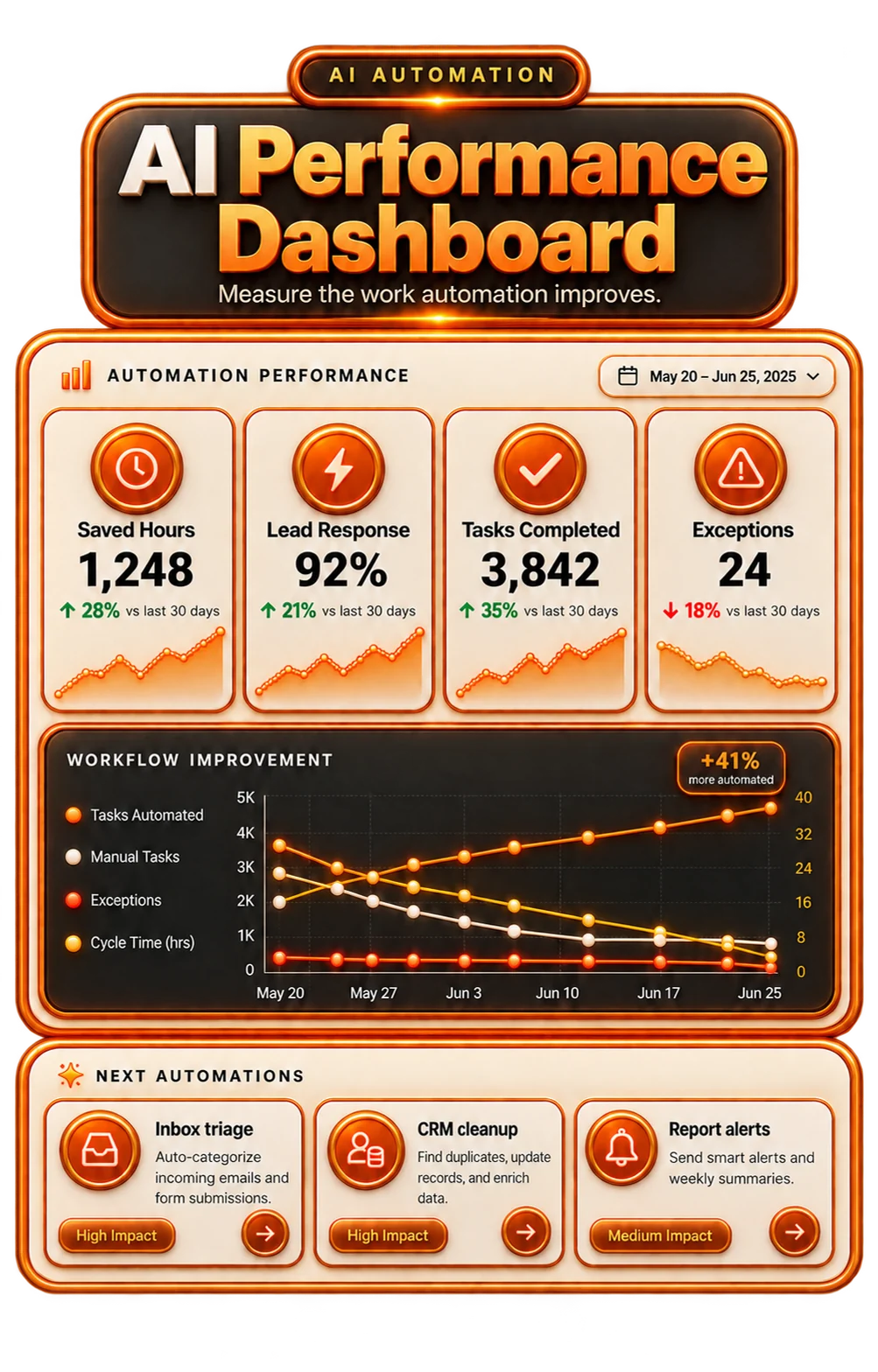
AI performance viewResponse, savings, approvals, exceptions, and next workflows.
(07)What people say
Client proof
Real clients. Real testimonials.
 ★★★★★
★★★★★
Millionify helped from strategy through launch, delivered the funnel professionally, and handled every change with care.
 ★★★★★
★★★★★
Communication was easy and consistent, the attention to detail was strong, and the final quality exceeded expectations.
 ★★★★★
★★★★★
Fast, responsive, accurate, and deeply knowledgeable. Millionify became the go-to team for funnel work.
 ★★★★★
★★★★★
Knowledgeable, communicative, and willing to go above and beyond to get the project right.
 ★★★★★
★★★★★
The work led to a meaningful increase in traffic and leads after the engagement.
 ★★★★★
★★★★★
Reliable, fast, honest, and straightforward to work with.
 ★★★★★
★★★★★
Millionify made sure every required piece was in place to complete the project successfully.
 ★★★★★
★★★★★
Helpful, patient, communicative, and genuinely invested in the outcome of the work.
(09)Questions
Your AI automation questions, answered.
We build AI-assisted lead routing, CRM follow-up, missed-call and missed-lead workflows, reply drafts, sales summaries, dashboards, internal knowledge assistants, content workflows, and support triage. We also connect WhatsApp, email, SMS, and the tools already used across your business.
No. AI handles repetitive steps, prepares context, drafts messages, flags problems, and suggests next actions. People retain approval over sensitive decisions and work that depends on relationships.
Usually. We plan around HubSpot, Salesforce, GoHighLevel, Zoho, Pipedrive, email, WhatsApp, calendars, forms, spreadsheets, helpdesks, Zapier, Make, n8n, Airtable, and dashboards already in use. We recommend replacement only when the current tools prevent the business outcome.
For most growth-focused businesses, lead handling is the strongest first workflow: capture the source, assign an owner, respond promptly, offer booking, create follow-up tasks, update the CRM, and show managers what happened. It is measurable and tied directly to revenue.
We put approvals, permissions, data boundaries, logs, test cases, fallback rules, and documented SOPs around each workflow. High-risk actions stay behind the controls and human decisions they require.
We agree on useful measures: response times, follow-up coverage, booked meetings, time saved, tickets triaged, reporting effort, recovered opportunities, and manual steps removed.
Ready to put AI to work across your business?
Show us the repetitive work, the leads or tasks that stall, and the tools your team uses today. Together, we will map a practical first AI automation.